

Syncing Into Your Organisation
Pull models into your organisation's catalog from your own provider account or from the curated Odock Catalog.
Syncing Into Your Organisation
Your organisation catalog lives at /{organisation}/models → Model Catalog, next to Models. Organisation Admins use it to sync entries before turning them into model records.
Odock Catalog models approved for all organisations already appear in Batch Create per provider. Sync from Odock Catalog only if you turned that off or need an editable copy. Sync from Provider model list to find private or fine-tuned models. See Automatic Odock Catalog Availability.
Two Sources, One Sync Flow
When syncing, choose the source:
| Source | What you get | Trade-off |
|---|---|---|
| Provider model list | Live list from your provider account, using your organisation provider key. Includes private and fine-tuned models. | Usually lacks pricing or capability metadata; set it afterward. |
| Odock Catalog | Odock's maintained list for that provider type. | Includes pricing and capabilities, but only for models Odock tracks. |
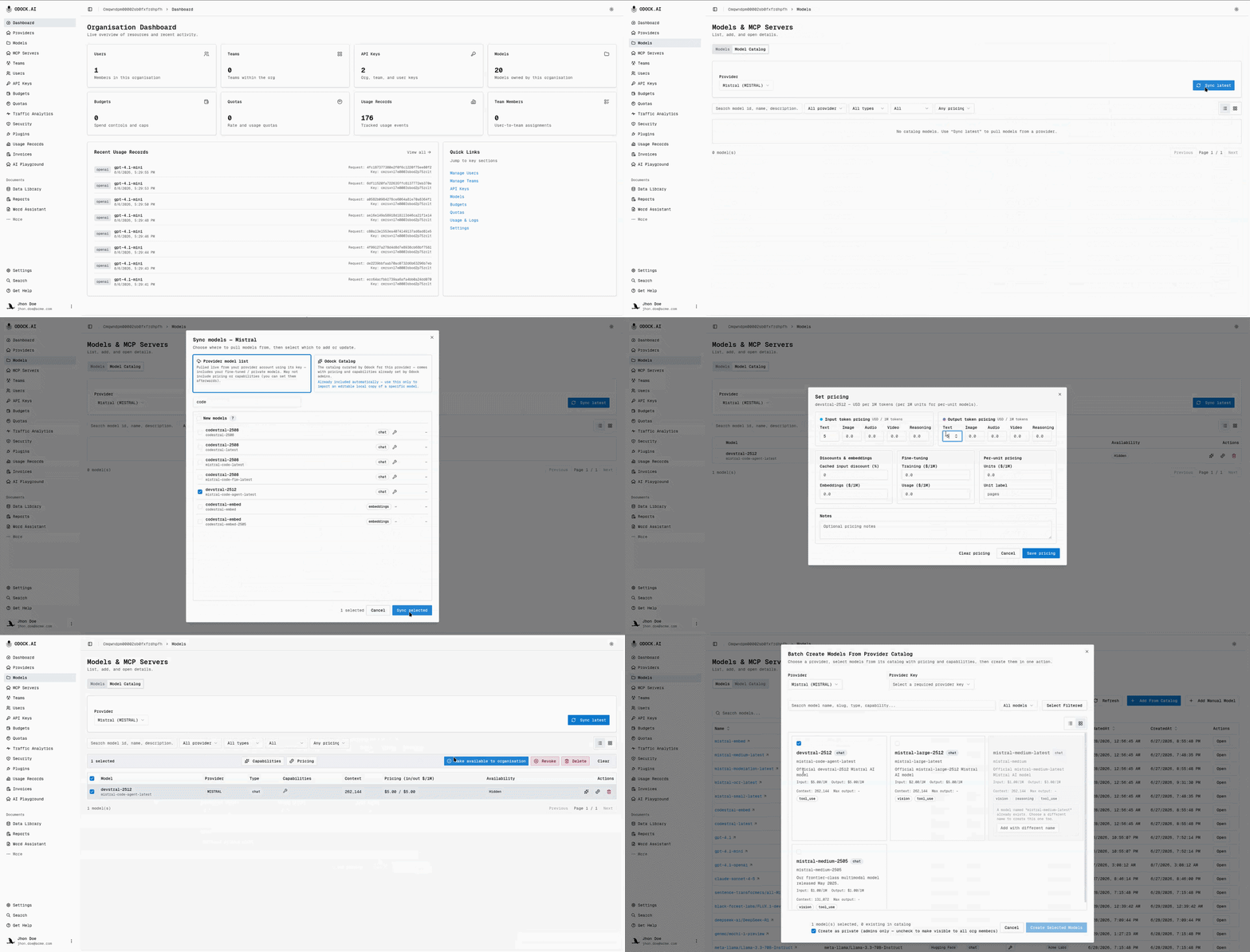
Open Models in your organisation, then the Model Catalog tab.
Select the provider in the sync bar and click Sync latest.
The dialog opens so you can choose a source and preview results before syncing.
Choose a source: Provider model list or Odock Catalog.
Switching sources reloads the preview and clears your selection. Choose the source first.
Review the preview, grouped into New models and Already in your catalog.
Selecting an existing catalog model updates it. Your pricing and capability edits are kept.
Search or scan the list, select the models you want, and click Sync selected.
Making A Synced Entry Available
Syncing adds entries to your organisation catalog. It does not make them selectable in Batch Create. Select the row and click Make available to organisation.
If the row matches an automatic Odock Catalog model by provider and model id, Resolve duplicate models asks you to Replace or Keep both. Rows with no match become available immediately. See Resolving a duplicate.
From Catalog Entry To Model Record
Making an entry available only adds it to Batch Create. It does not create a callable model record. Use Batch Create to create the record. See Add models from the catalog.
Choosing A Source In Practice
| Situation | Use |
|---|---|
| You want a fine-tuned or private model only your account can see | Provider model list |
| You want a standard model with correct default pricing and no custom changes | Nothing; it is already automatic. See Automatic Odock Catalog Availability |
| You want your own editable copy of an Odock Catalog model, e.g. for client-specific pricing | Odock Catalog, then Keep both when making it available |
| The Odock Catalog does not yet list a model you need | Provider model list, then set pricing yourself in Models |
| Use Odock's Catalog is off for this provider | Odock Catalog, so you have a route to Odock's curated metadata without the automatic setting |
Continue With
- Automatic Odock Catalog Availability — the setting that makes syncing unnecessary for most models, and the duplicate-resolution flow.
- Add models from the catalog — turning a synced catalog entry into a callable model.
- Tutorials for a full walkthrough.