

Build Your First Flow
Build, save, and activate an organisation-wide flow that downgrades one model for non-enterprise callers and notifies a webhook.
Build Your First Flow
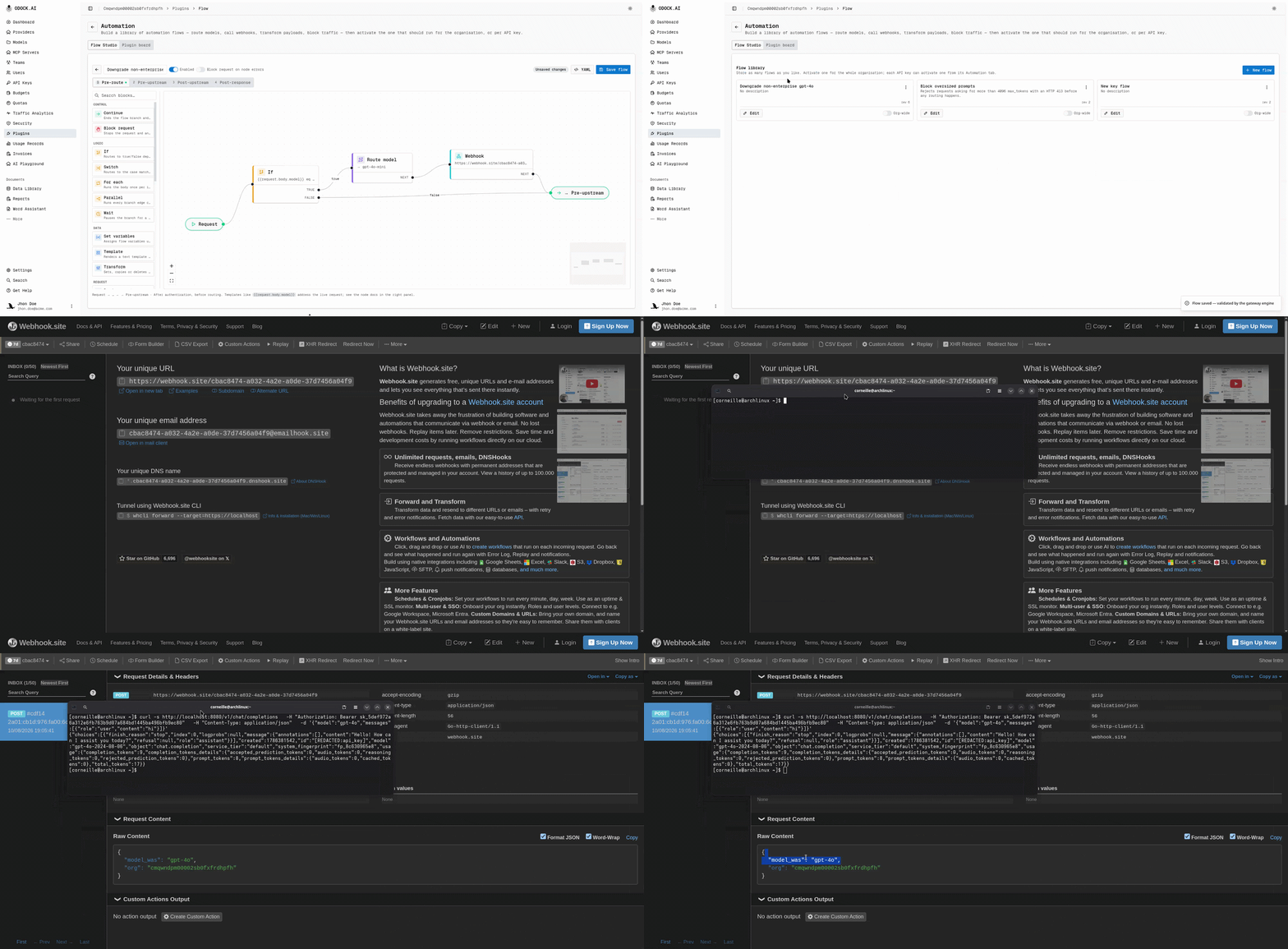
Goal: route organisation-wide gpt-4o requests from non-enterprise callers to gpt-4o-mini, then notify a webhook.
This uses one condition, one route action, and one integration action.
Open Plugins in your organisation, then the Flow Studio tab.
This is the flow library. It contains active and inactive flows.
Click New flow.
Name it clearly, for example "Downgrade non-enterprise gpt-4o". Start blank for this tutorial.
The editor opens with four phase tabs. Each phase starts with a start node connected to its end point.
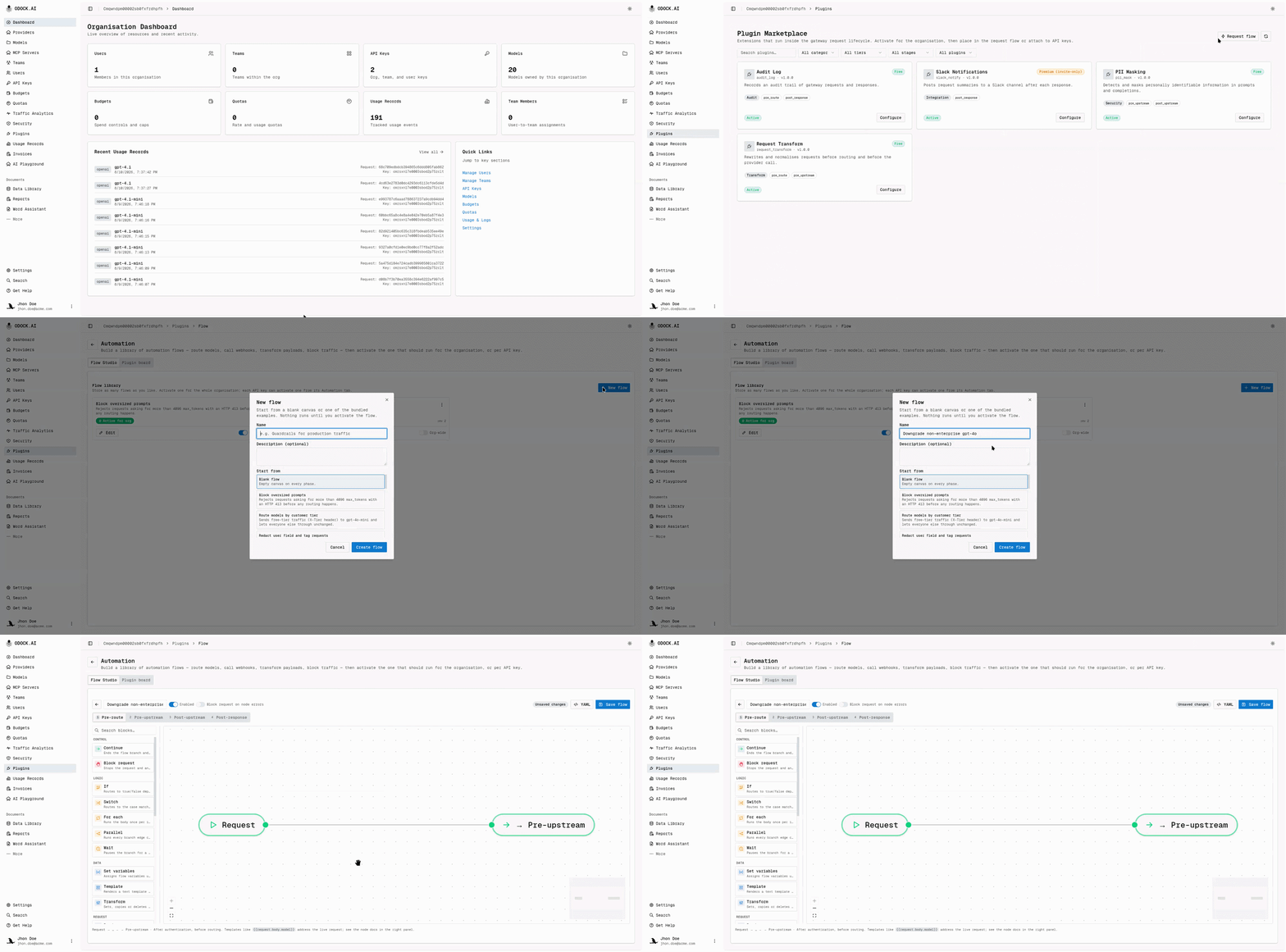
Choose the Pre-route phase tab.
You are changing the target model, so run before routing. Rule: change the request in Pre-route or Pre-upstream; change the response in Post-upstream; notify or audit in Post-response.
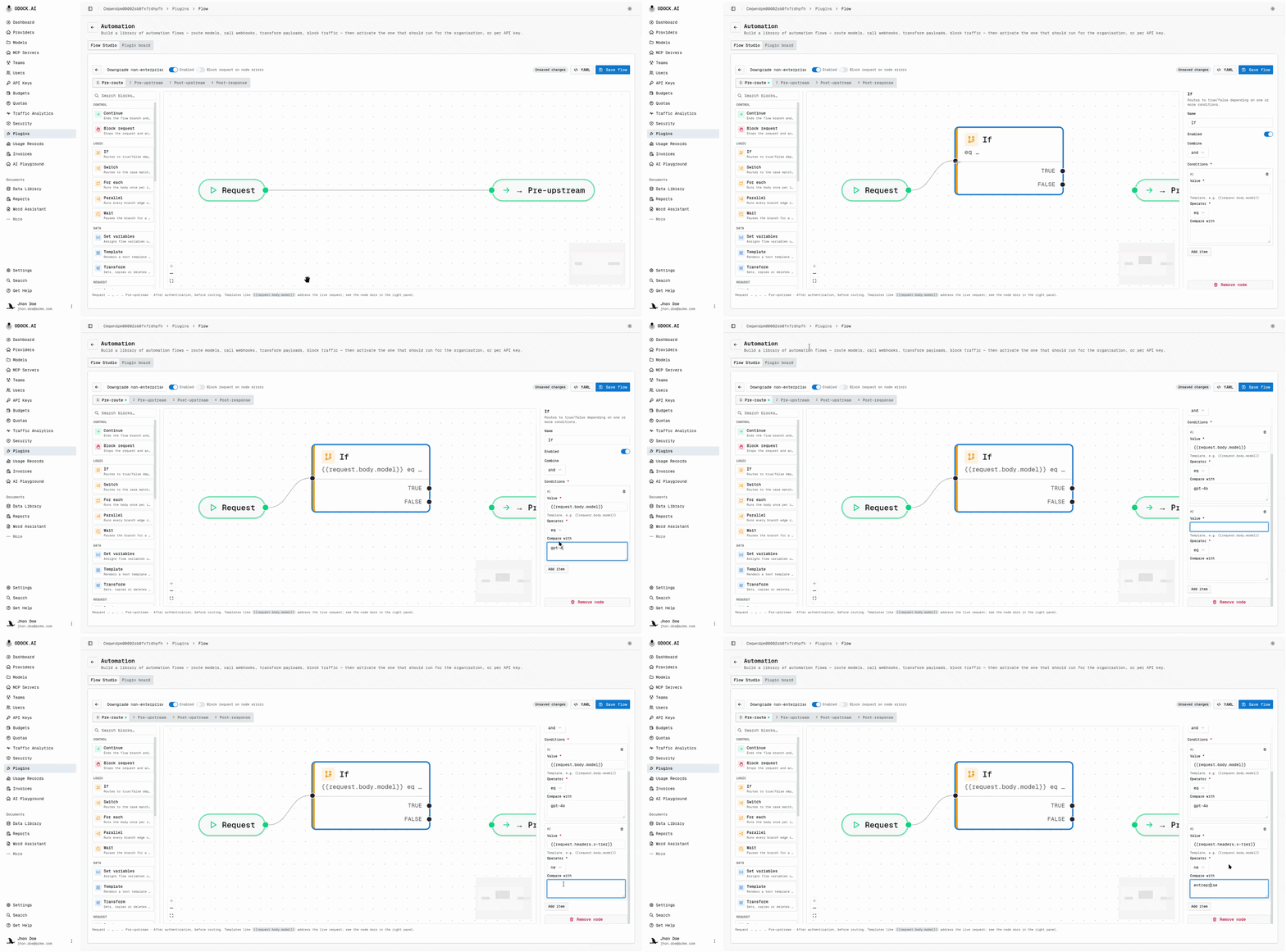
Add an If node from the palette (under Logic).
Select it and configure these conditions with and:
| Left | Operator | Right |
|---|---|---|
{{request.body.model}} | equals | gpt-4o |
{{request.headers.x-tier}} | not equals | enterprise |
Connect the Start node to the If node's input.
Add a Route Model node (under Request).
Set its model to gpt-4o-mini. Connect the If node's true output to it.
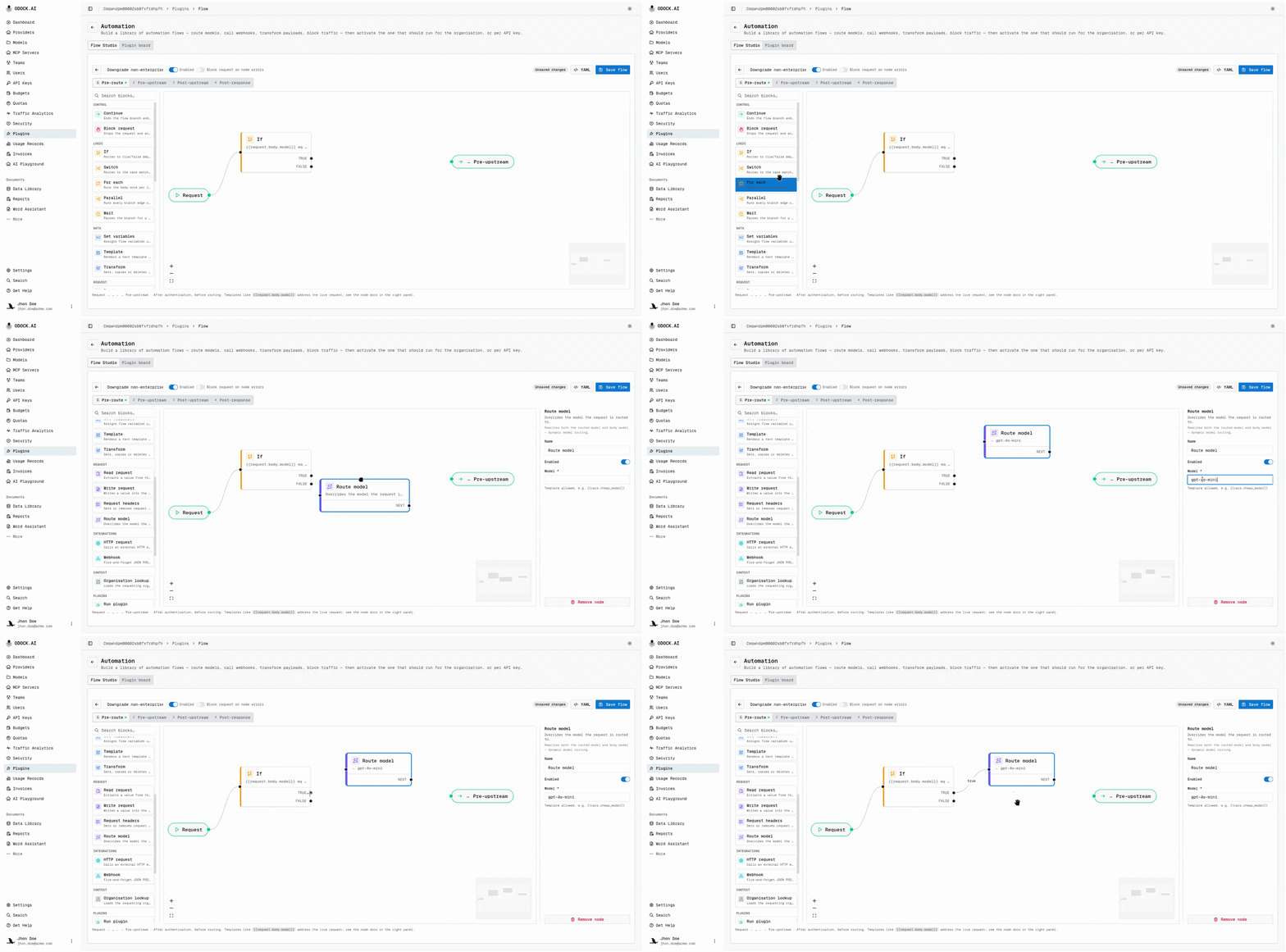
Add a Send Webhook node (under Integrations).
Set the URL to your notification endpoint and use a payload like:
{ "org": "{{request.organisation_id}}", "model_was": "gpt-4o" }Connect Route Model to Send Webhook.
Wire both remaining loose ends to the phase's end point.
Connect Send Webhook to the end node. Connect the If node's false output to the same end node. This makes the no-op path explicit.
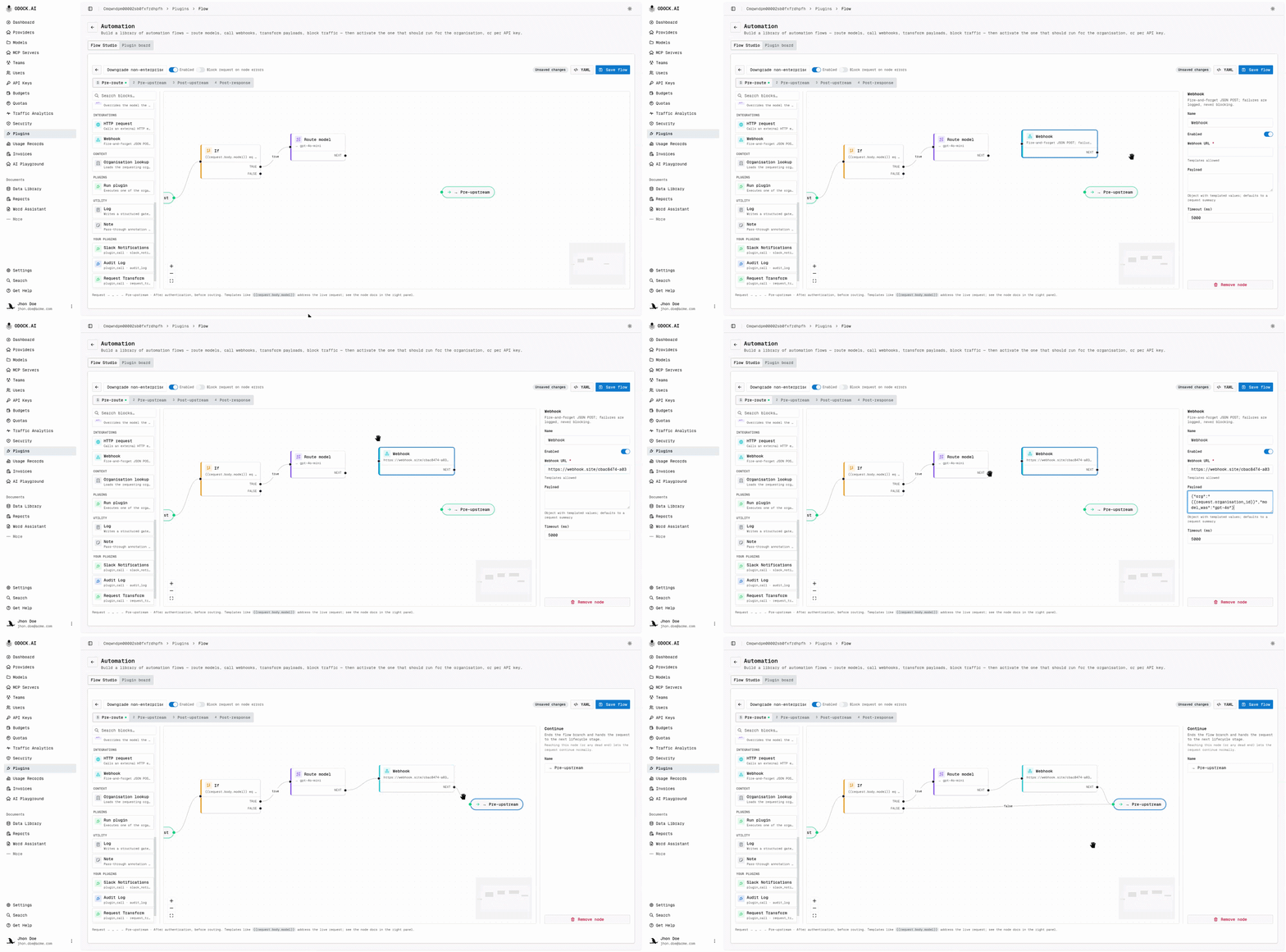
Click Save flow.
Flow Studio checks schema, structure, and the live gateway engine. A successful save confirms gateway validation.
Activate the flow.
Saving stores the flow only. It does not run. Return to the library and switch Org-wide on. The change takes effect immediately.
Send a test request.
curl -s https://your-odock-gateway/v1/chat/completions \
  -H "Authorization: Bearer sk-your-test-key" \
  -H "Content-Type: application/json" \
  -d '{"model":"gpt-4o","messages":[{"role":"user","content":"hi"}]}'
Use a test key without the x-tier: enterprise header. The response should use gpt-4o-mini, and the webhook should receive the payload.
The Same Flow As YAML
Open YAML in the toolbar to view the document as text. Use it to move flows between organisations, store configuration, or edit faster than the canvas.
version: 1
name: Downgrade gpt-4o for non-enterprise
on_error: continue
phases:
  pre_route:
    nodes:
      - {id: start, type: start}
      - id: check
        type: if
        config:
          combine: and
          conditions:
            - {left: "{{request.body.model}}",     op: eq, right: gpt-4o}
            - {left: "{{request.headers.x-tier}}", op: ne, right: enterprise}
      - {id: reroute, type: model_route, config: {model: gpt-4o-mini}}
      - id: notify
        type: webhook_send
        config:
          url: https://hooks.example.com/downgrades
          payload: {org: "{{request.organisation_id}}", model_was: gpt-4o}
      - {id: end, type: end}
    edges:
      - {from: start,   to: check}
      - {from: check,   to: reroute, handle: "true"}
      - {from: check,   to: end,     handle: "false"}
      - {from: reroute, to: notify}
      - {from: notify,  to: end}
Paste edits back with Apply to canvas to render the graph.
Next
- Activate a flow on one API key if you want to pilot a change on one key before rolling it out to the whole organisation.
- Debug a flow run to read the node-by-node trace for a specific request.
- Building Blocks for the full node reference.