

Policy Configuration
Enforce vs. monitor mode, thresholds, and per-module tuning for your organisation's SafetySec behavior.
Policy Configuration
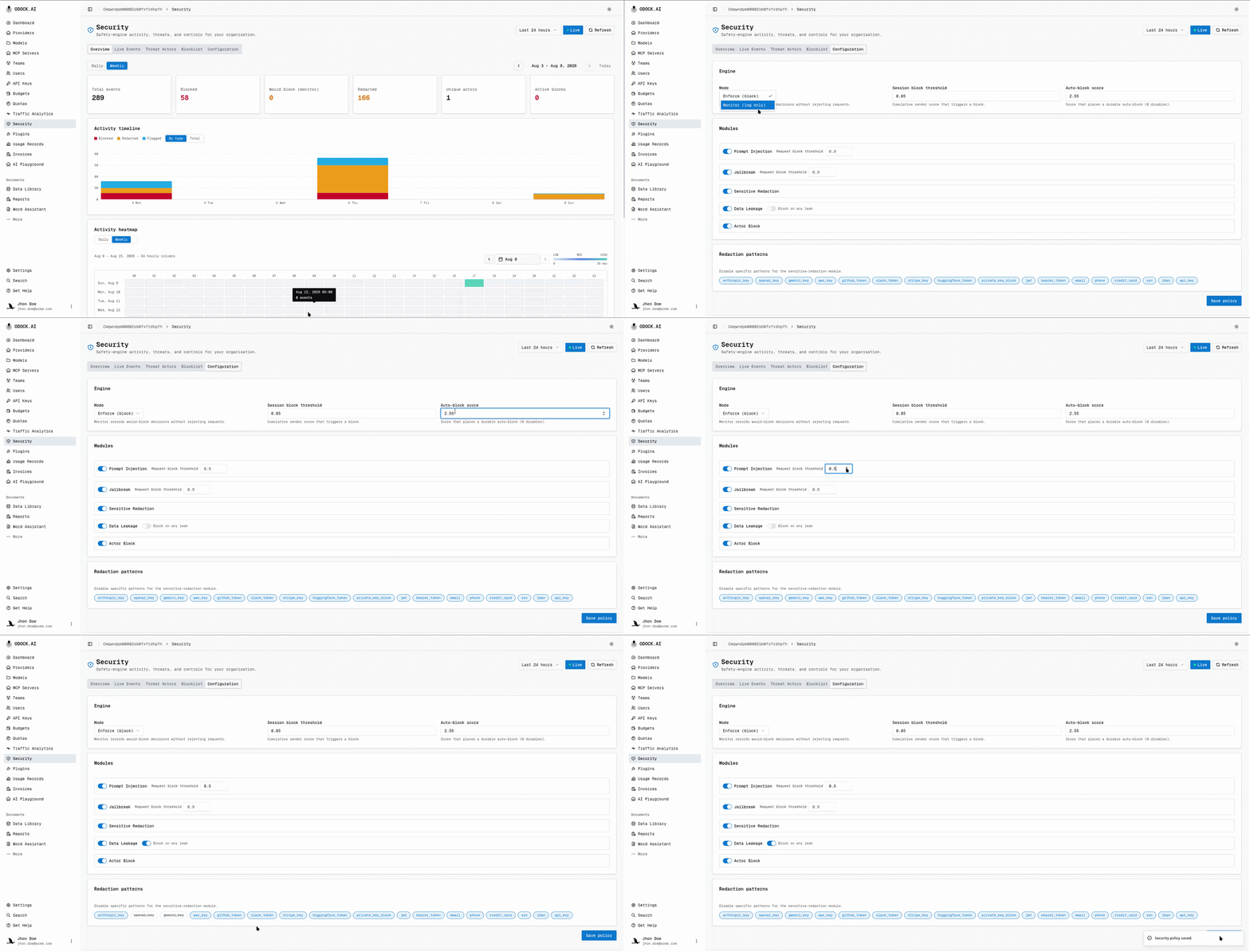
Each organisation has its own SafetySec policy. Organisation Admins edit it in Security Console → Configuration.
Mode: Enforce Or Monitor
| Mode | Behavior |
|---|---|
| Enforce | A decision that would block a request actually blocks it. |
| Monitor | Nothing is blocked. Every decision that would have blocked is recorded as Would-block instead, visible in Overview and Live Events. |
Use Monitor mode to roll out a new organisation or policy change. It shows what would happen without blocking live traffic. See Roll out SafetySec with monitor mode.
Thresholds
| Setting | Controls |
|---|---|
| Session block threshold | The cumulative session score at which a sender's behavior is blocked (in enforce mode) or flagged as would-block (in monitor mode). |
| Auto-block score | The cumulative session score at which the engine places a durable automatic block on its own. Set to disable to turn off auto-blocking for this organisation. |
Session scores accumulate across recent requests. One borderline finding rarely triggers action; repeated suspicious behavior can. See Blocklist & Threat Actors for auto-block behavior.
Per-Module Tuning
Tune each module independently: prompt injection, jailbreak patterns, sensitive redaction, and data leakage.
| Control | Effect |
|---|---|
| Enabled | Turn the module off entirely for this organisation. |
| Request block threshold | How confident a single request's finding must be before it blocks on its own, independent of session history. |
| Redact requests / responses | Toggle which direction sensitive redaction applies to. |
| Redact on leak / Block on leak | For data leakage, whether a detected leak is redacted, blocks the response, or both. |
| Disabled redaction patterns | Turn off individual sensitive-value patterns (for example, disable the phone-number pattern for a product that legitimately handles phone numbers). |
Choosing Thresholds
Tune one module at a time, then observe again. Session thresholds and module thresholds interact: changing a module threshold changes finding volume and session-score accumulation.
Where Configuration Applies
A policy applies to one organisation only. It changes how aggressively modules act for that organisation; it does not change which modules exist.
Continue With
- Roll out SafetySec with monitor mode
- Blocklist & Threat Actors
- Security Modules for what each module family detects.