

Configure API Key Policies
Add workload-specific guardrails to one virtual API key.
Configure API Key Policies
Use API key policies when one application, workflow, or agent needs a stricter envelope than the organisation default.
Open API Keys in your organisation.
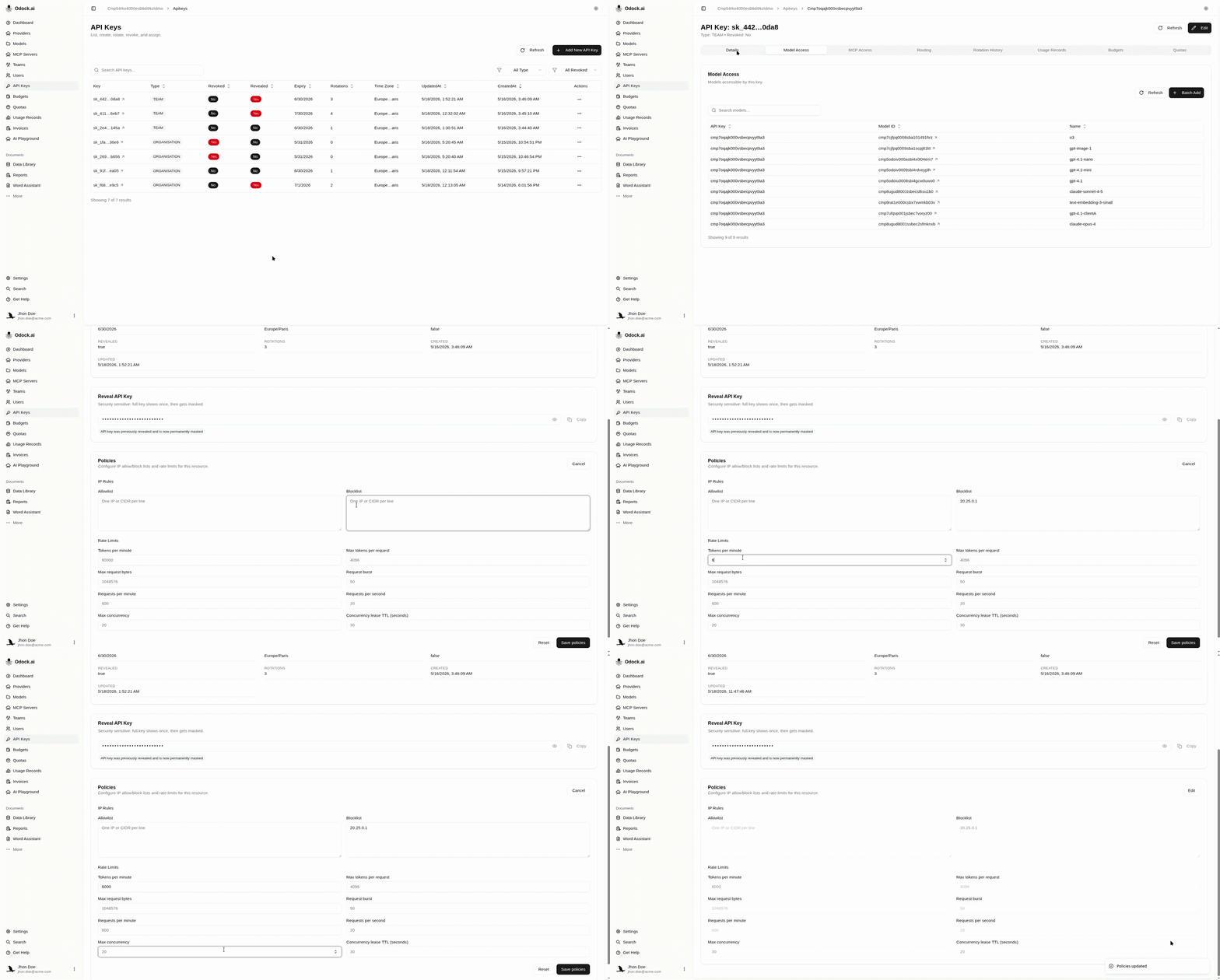
Open the API key detail page.
The detail page shows the key scope, model access, MCP access, budgets, quotas, usage records, and the Policies card.
Confirm the key has the correct resource grants.
Open Model Access or MCP Access on the same page. The key must have access to the resource before policy limits matter.
For details, see API key access grants.
Find the Policies card and click Edit.
Set the key-specific limits.
Useful API key examples:
| Workload | Recommended controls |
|---|---|
| Customer-facing app | requests per second, requests per minute, max concurrency, max tokens per request |
| Batch job | requests per minute, tokens per minute, quota |
| Internal agent | allowed model/MCP grants, max request bytes, budget, quota |
| Experiment key | low RPM, low budget, short expiry |
Save policies.
Send a test request with that API key.
If you intentionally set a low limit, repeat the request until Odock returns a rate-limit response. Then review usage and request logs using Verify enforcement.
Why This Works
The API key is the runtime identity of the caller. API key policies are the most practical place to isolate one application from the rest of the organisation.
For key lifecycle and rotation, see Virtual API Keys.