

Add a variant model
Create another Odock model name for the same upstream model slug.
Add a variant model
A variant model is another Odock model record for the same upstream provider slug, under a different Odock model name.
Example: create gpt-4.1-clientA as the Odock model name while keeping gpt-4.1 as the upstream slug. Client A calls gpt-4.1-clientA; Odock forwards to upstream gpt-4.1.
Why Use A Variant Model
Use a variant when different teams, clients, projects, or environments need different governance for the same upstream model.
Common reasons include:
- Client-specific naming: expose
gpt-4.1-clientAwithout changing the upstream slug. - Different pricing: apply client, internal, discount, or project pricing while another record keeps defaults.
- Different policies: set stricter rate limits, IP rules, or payload limits for one project.
- Separate access grants: give one API key access to
gpt-4.1-clientAwithout granting access to the defaultgpt-4.1model record. - Cleaner usage reporting: show the client, project, or workload in usage records.
- Migration safety: later point a stable project model name to a new upstream slug without changing application code.
How It Works
Applications send the model Name to Odock. Odock sends the model Slug upstream.
For a variant model:
| Field | Example |
|---|---|
| Name | gpt-4.1-clientA |
| Slug | gpt-4.1 |
| Provider | Same provider as the original model |
| Provider Key | Same key or a different provider key, depending on your setup |
| Pricing | Default pricing or client/project-specific pricing |
| Policies | Default policies or variant-specific policies |
Create A Variant From The Catalog
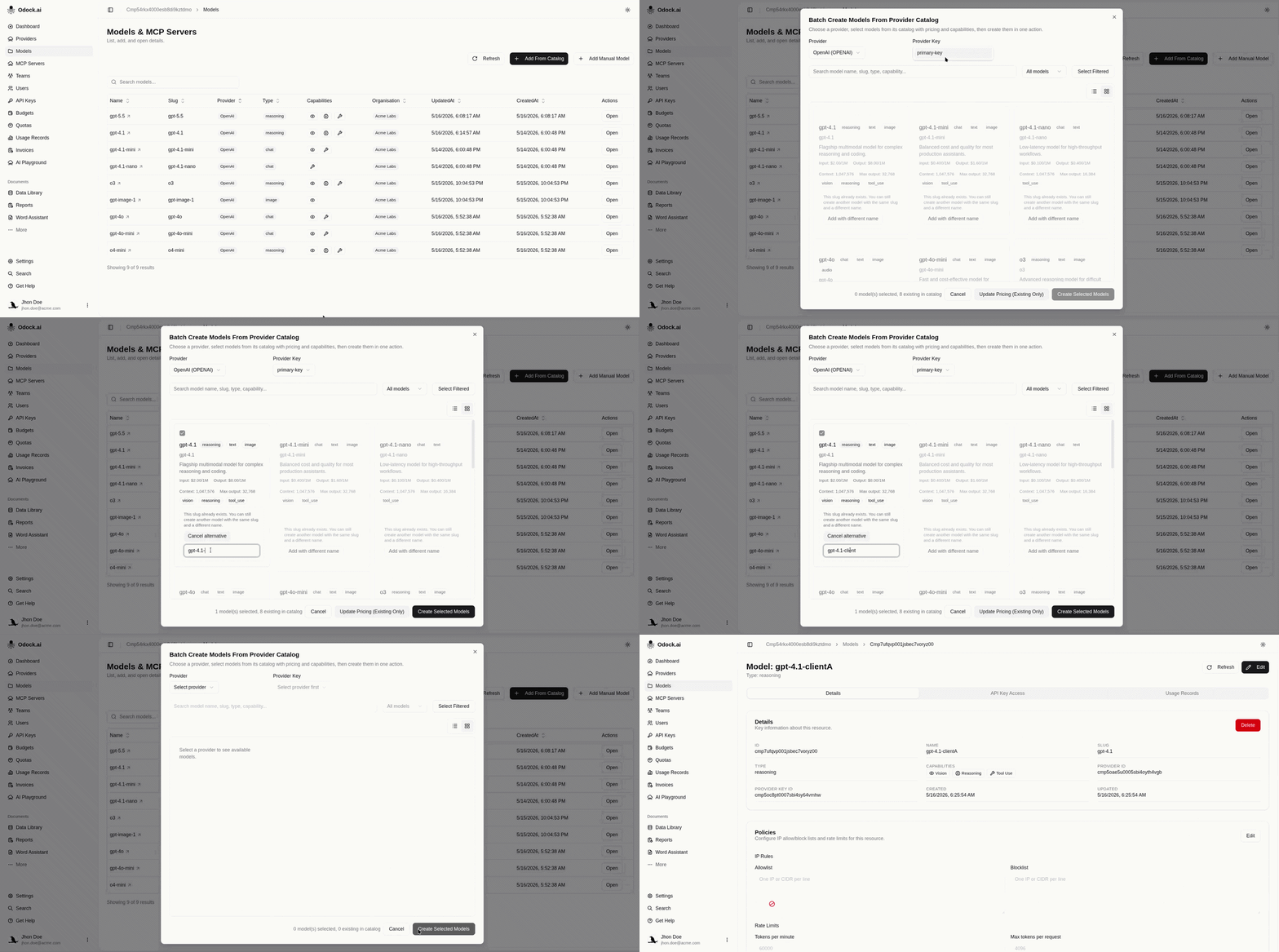
Batch Create blocks only duplicate names. Reusing the upstream slug is allowed. Create a variant in either way:
- Select a catalog card that already has a distinct name, such as an Alongside Odock entry. See Automatic Odock Catalog Availability.
- If the catalog card name collides with an existing model, click Add with different name and keep the same upstream slug.
Open the provider detail page for the provider that already has the base model.
In the Models section, click Batch Create.
Select the provider key.
Find the model with the upstream slug, such as gpt-4.1.
If the card name collides, click Add with different name. If the name is already distinct, select it directly.
Enter the new Odock model name, such as gpt-4.1-clientA.
Create the selected model.
Open the new model and adjust pricing, policies, and API key access for the client or project.
After Creating The Variant
After creating the variant, grant access only to the API keys that should use it. For a client or project variant, update the application's model setting:
{
  "model": "gpt-4.1-clientA"
}
Then confirm usage records show the variant model name.