

Traces
Span hierarchy, custom dimensions, and trace correlation.
Traces
Traces are the request reconstruction surface of the LGTM stack. When you need to understand where a request spent time or where it failed inside the gateway, traces are the most precise signal.
odock-server exports OpenTelemetry traces over OTLP HTTP to the OTel Collector, which forwards them to Tempo.
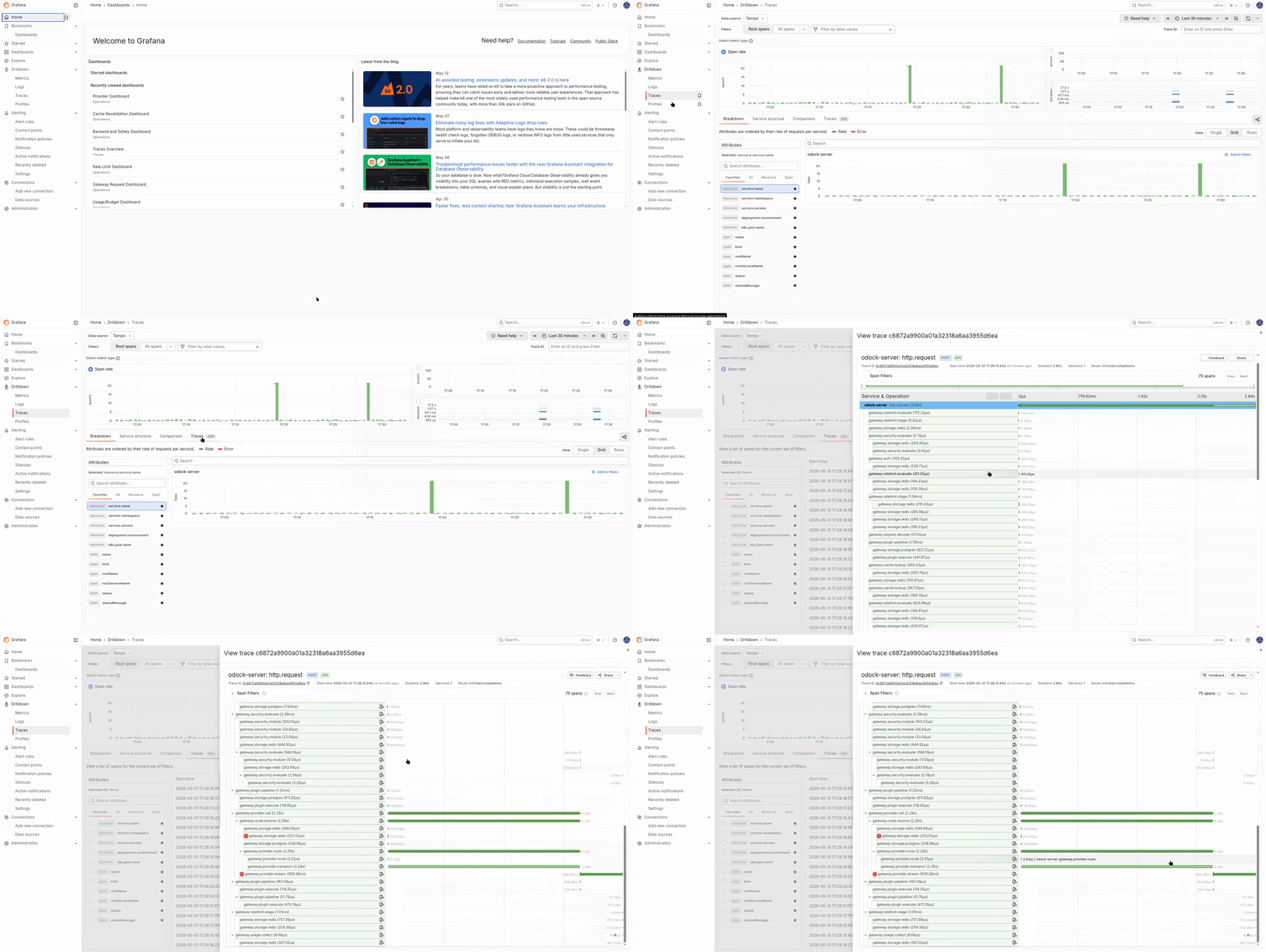
Span Hierarchy
Important events within spans include:
- first stream chunk on
gateway.provider.stream - provider or routing retry events on
gateway.provider.requestandgateway.route.resolve alloworrejectdecisions ongateway.ratelimit.stagealloworblockdecisions ongateway.security.modulereserved,settled, andreleasedevents ongateway.budget.enforce
Canonical Trace Dimensions
Spans carry stable gateway attributes so you can filter by workload, route, plugin, or decision:
| Attribute | Meaning |
|---|---|
organization.id | Owning organisation |
gateway.request_id | Request id, also the X-Request-Id header |
gateway.provider | Resolved provider id |
gateway.module | Active subsystem such as auth, routing, plugin, or provider |
gateway.plugin.chain, gateway.plugin.name, gateway.plugin.kind, gateway.plugin.stage | Plugin pipeline coordinates |
gateway.security.module | Active safety module |
gateway.ratelimit.stage, gateway.ratelimit.module | Rate-limit stage and module |
gateway.route, gateway.model, gateway.endpoint | The resolved route, model, and endpoint |
gateway.stream | Whether the request is streaming |
gateway.cache.hit | Cache outcome |
gateway.decision | Stable per-phase decision such as allow, block, or reroute |
gateway.retry_count | Number of retries inside the span |
gateway.budget.window | Budget window id when applicable |
gateway.usage.publisher | Usage publisher target |
error.class | Stable error classification |
Correlation With Logs And Usage Records
The cross-surface chain is:
- the application receives
X-Request-Id - the same
requestIdappears on the usage record detail page - the same request id appears on gateway log lines in Loki
- the
traceIdon the usage record opens the span tree in Tempo
That chain is what makes an investigation reproducible between application teams and platform teams.
Sampling
Trace sampling is controlled by OBSERVABILITY_SAMPLE_RATE. The default production-style value is 0.1, which keeps 10% of traces.
Usage Records and Traffic Analytics remain complete even when traces are sampled. If you cannot find a trace for a request, continue with usage records and logs.
See OTEL configuration.
Tips
When investigating provider incidents, group gateway.provider.request spans by gateway.provider first. That usually identifies the failing edge faster than a full trace-by-trace review.
A trace can leave odock-server successfully and still fail later in the Collector pipeline. If traces look incomplete, check Collector exporter failures in Prometheus.