

Create a team budget
Add a scoped spend ceiling for a team.
Create a team budget
Use a team budget when a team should have its own spend ceiling inside the organisation budget. Team budgets apply to traffic from API keys scoped to that team.
For example, if the organisation has a monthly global budget, you can also give the Support team a weekly or monthly budget so that team cannot consume the full organisation budget alone.
Open your organisation workspace.
Open Budgets from the sidebar.
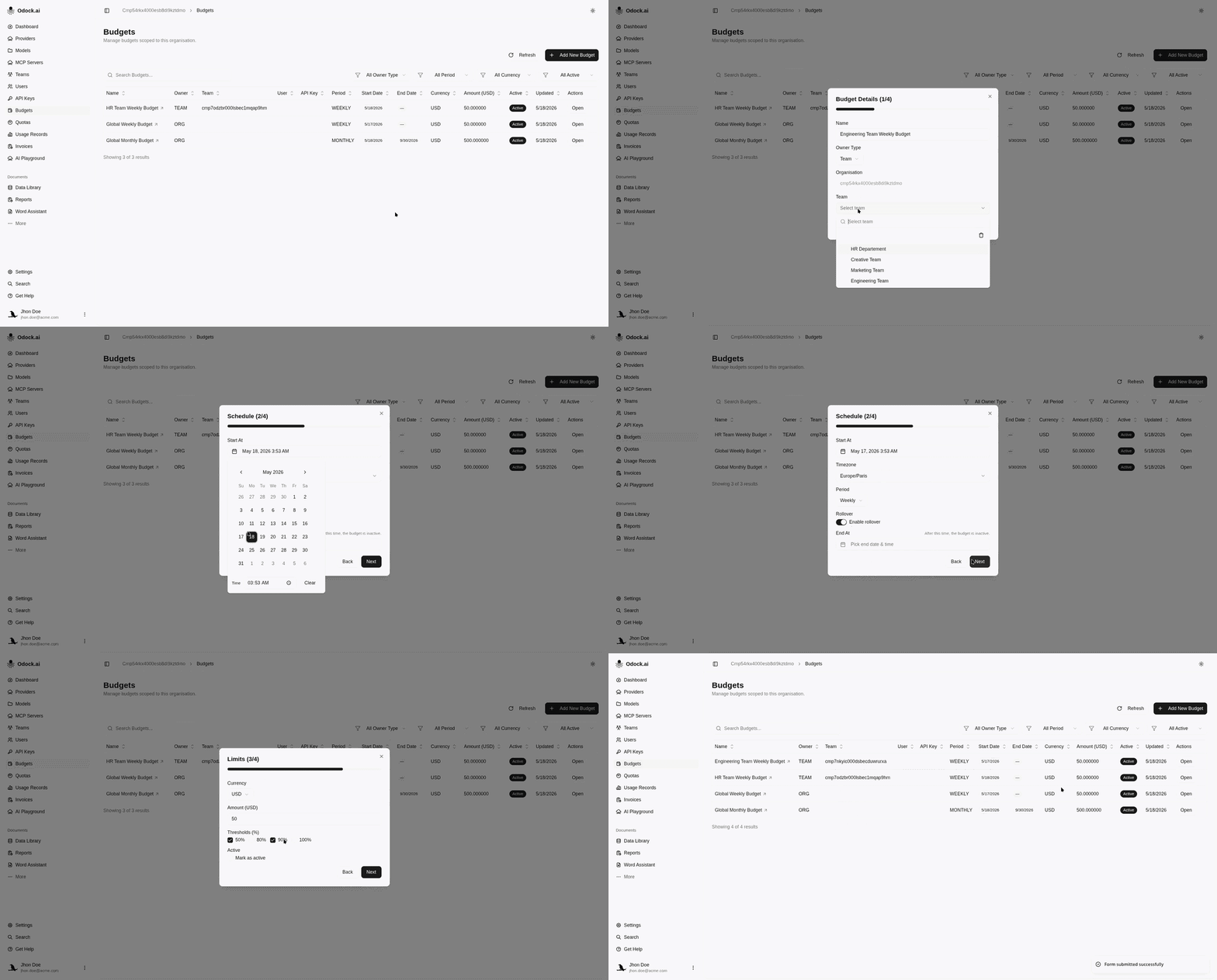
Click Add New Budget.
Enter a name, such as Engineering weekly budget or Engineering team monthly budget.
Set Owner Type to Team.
Select the team that should own the budget.
In Schedule, choose the start date, timezone, and period.
Use Weekly for a recurring weekly team envelope, or Monthly for a monthly team ceiling.
Leave End At empty if the team budget should keep applying every period.
In Limits, choose currency and enter the amount.
Select threshold percentages if you want warning points.
Keep Active checked and create the budget.
How It Is Enforced
A team budget is checked when the request uses a team-scoped API key for that team.
The request may still also be checked against organisation budgets and API-key budgets. All active matching budgets must have capacity.
Common Setup
Use layered budgets:
- Organisation monthly budget for the global ceiling.
- Team weekly budget for short-term team control.
- API-key daily budget for a specific app or workflow.