

ObservabilityTraffic Analytics
Traffic
How much traffic, where it comes from, and when it lands.
Traffic
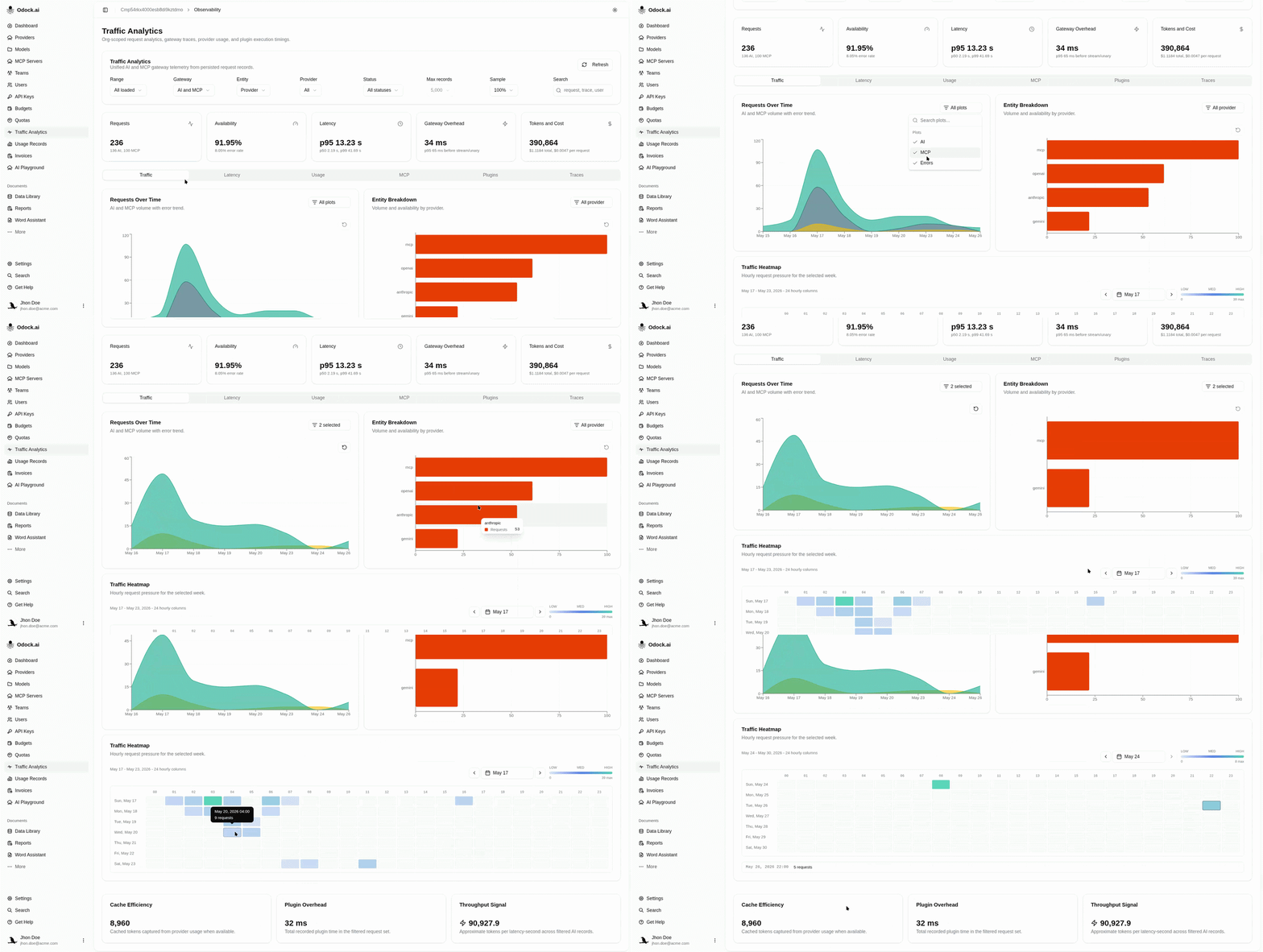
The Traffic tab is the default view of the Traffic Analytics page. It answers three questions visually.
Visualizations
| Chart | Answers |
|---|---|
| Requests Over Time | How is volume trending? Daily AI, MCP, and error counts. |
| Entity Breakdown | Where is it coming from? Top values for the chosen entity (provider, model, key, etc). |
| Traffic Heatmap | When does it land? Day-by-hour grid of request density. |
Workflow
Pick a Range in the filter bar — start with 7 days.
Pick an Entity — provider, API Key, or model are the most useful starting points.
Glance at Requests Over Time for the shape — is today different from last week?
Read Entity Breakdown to see who owns the slice.
Scan the Traffic Heatmap for bright cells outside your business hours — usually a runaway job or a misconfigured cron.
Interacting With The Charts
- Toggle series on and off with the Plot selector above each chart.
- Click and drag on a chart to zoom into a sub-range. Reset returns to the full view.
Tips
If the Errors series tracks volume, the cause is volume-correlated — likely upstream throttling. If errors stay flat while volume grows, you are scaling cleanly.