

Plugins
Per-plugin runtime and per-plugin health.
Plugins
The Plugins tab is the which plugins are running, how long, and how well view.
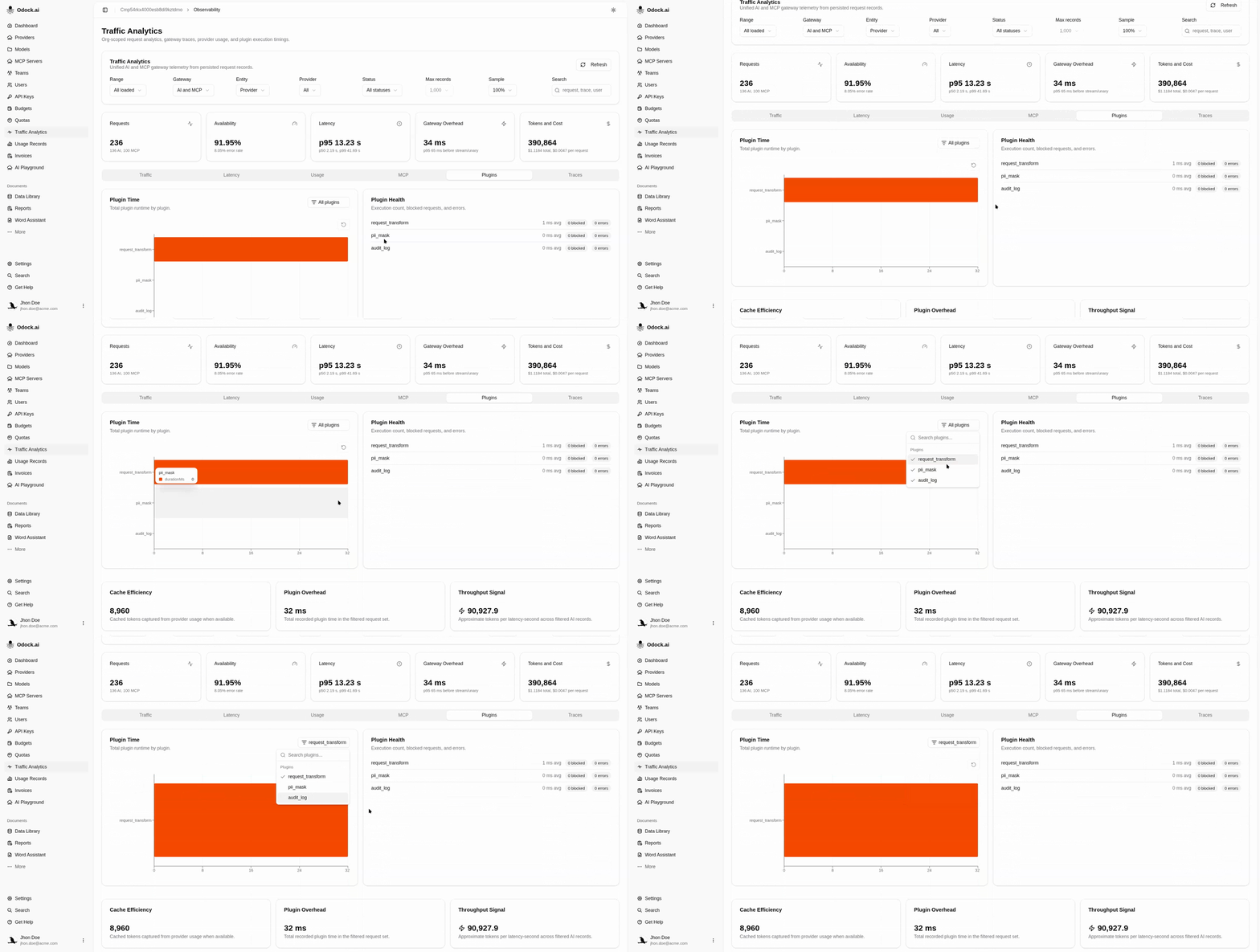
Visualizations
| View | Answers |
|---|---|
| Plugin Time | Which plugin is the most expensive in total? Bar chart of total plugin runtime in the slice. |
| Plugin Health | Are any plugins erroring or blocking? A list of each plugin's average duration, with badges for blocked and error counts. |
A blocked outcome means the plugin stopped a request from proceeding further. An error outcome means the plugin itself failed.
Workflow
Open this tab when Latency shows a gateway-overhead regression.
Look for one plugin that stands out tall in Plugin Time.
Cross-check Plugin Health — is the height driven by volume (low avg, lots of executions) or per-call cost (high avg)?
If the Blocked count is non-zero, decide whether the policy is right or too aggressive — see Plugin Lifecycle.
If the Errors count is non-zero, open one of the affected records and read the Metadata card on the record detail page for the error string.
Empty State
If your keys do not use plugins, the list shows No plugin timing metadata in the loaded records. That is the expected state when no plugin chain is attached.
Tips
A plugin with low avg but a tall bar is high-volume. Tighten its scope — apply it on fewer routes or keys — instead of optimizing the plugin code.