

ManagementVirtual API Keys
Monitor an API key
Review usage, budgets, quotas, routing, and key health.
Monitor an API key
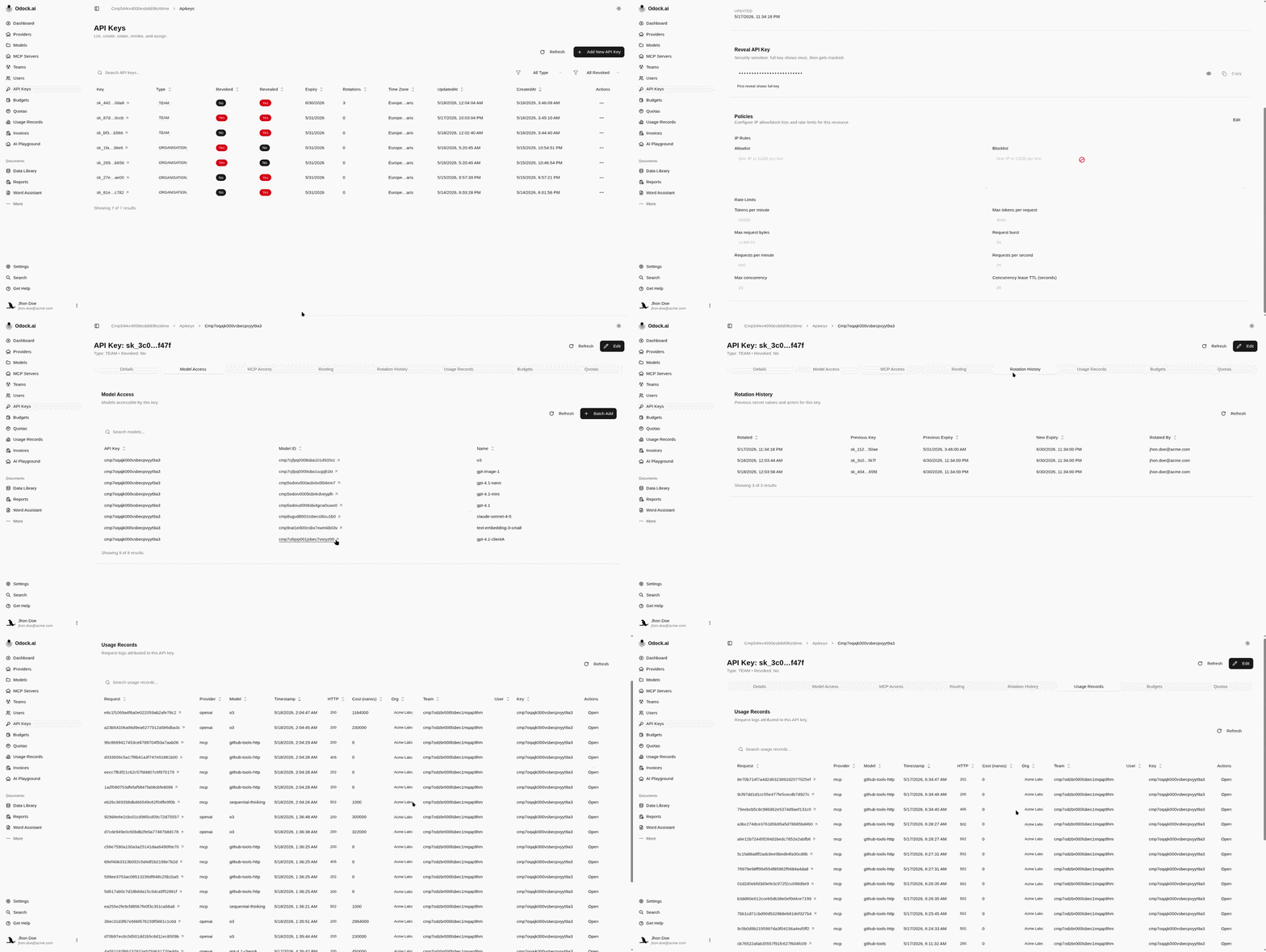
Use the key detail page to understand what a runtime credential is doing.
Open API Keys.
Open the key you want to inspect.
Review key details: type, owner, expiry, timezone, revoked state, revealed state, and rotation count.
Review Model Access and MCP Access.
Review Rotation History to see previous masked secrets, previous expiry, new expiry, rotation date, and rotating user.
Review Usage Records for requests attributed to this key.
Open individual usage records to inspect provider, model, status, latency, token breakdown, cost, and routing metadata.
Review Budgets and Quotas attached to the key.
Questions This Page Answers
| Question | Where to look |
|---|---|
| Is this key still usable? | Revoked, expiry, and timezone fields. |
| Has this key been rotated? | Rotations field and Rotation History section. |
| Can I reveal the current secret? | Revealed field and Reveal API Key card. |
| What can this key call? | Model Access and MCP Access. |
| Is the key near a limit? | Budgets and Quotas sections. |
| What did it cost? | Usage Records and record billing details. |
| Did routing happen? | Usage record Routing card. |